Saudi Market6 min read
AI Invoice Processing and ZATCA E-Invoicing: What Saudi SMEs Should Know
Key takeaways
- ZATCA e-invoicing (Fatoora) covers the invoices you issue; Phase 2 integration now reaches many Saudi SMEs.
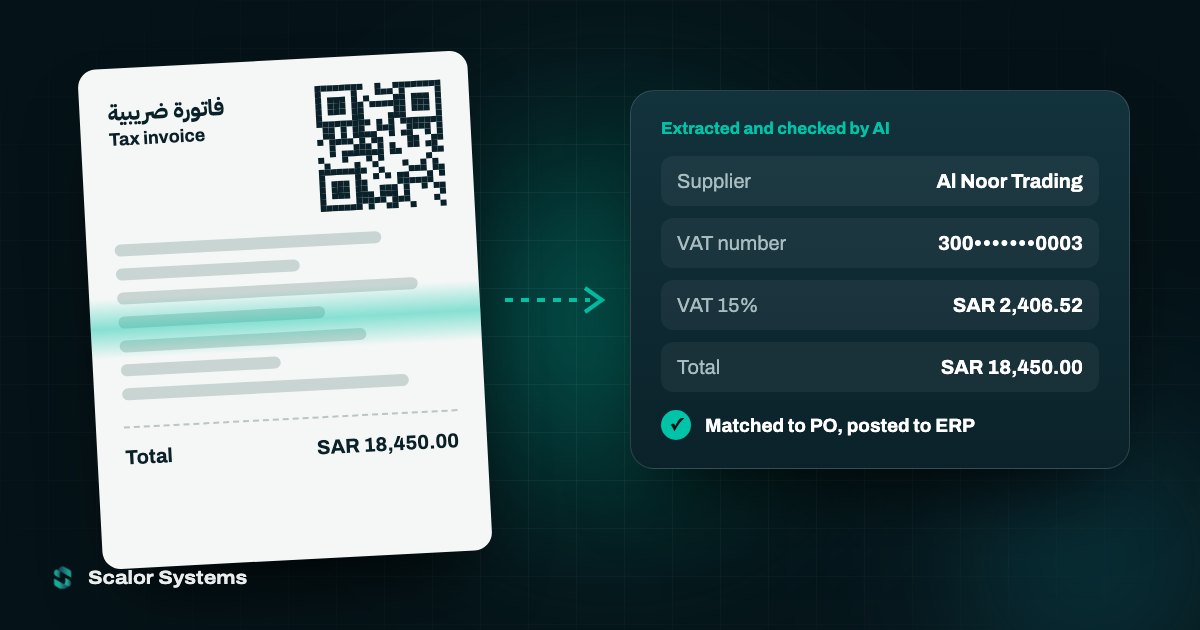
- AI invoice processing covers the invoices you receive: reading, checking, matching to POs and posting to your ERP.
- The biggest time savings come from automated matching and reviewing only the exceptions AI flags.
ZATCA’s e-invoicing programme (Fatoora) has moved steadily down the revenue ladder, and now reaches many Saudi SMEs. Many finance teams are asking how it relates to AI invoice processing. The short answer: they solve different problems, and they work well together.
A quick recap of ZATCA e-invoicing
Phase 1 (generation) required businesses to issue invoices electronically. Phase 2 (integration) requires them to connect their invoicing or ERP system to ZATCA’s Fatoora platform, with structured XML invoices, QR codes and cryptographic stamps. ZATCA brings taxpayers into Phase 2 in waves based on revenue. For example, Wave 24 covered taxpayers whose VAT-subject revenue exceeded SAR 375,000 in 2022, 2023 or 2024, with integration due by 30 June 2026. Check ZATCA’s official site for the wave that applies to you.
E-invoicing covers the invoices you issue
ZATCA compliance is mainly about the invoices you send. You need a compliant e-invoicing solution, usually built into your ERP or accounting software or provided by a specialist vendor. AI doesn’t replace that.
AI helps with the invoices you receive
Accounts payable is where most manual work remains. Supplier invoices arrive as PDFs, scans and e-invoices in Arabic and English, and someone has to check and enter them. AI invoice processing can:
- Read supplier invoices in Arabic and English, including tax invoice details.
- Extract the supplier, VAT number, amounts, VAT and line items.
- Match each invoice to its purchase order and delivery note.
- Flag duplicates, mismatches and missing information for review.
- Post approved invoices into your ERP without re-typing.
Where the time savings come from
The biggest gains are in matching and exceptions. Instead of checking every invoice by hand, your team reviews only the ones the AI flags. That shortens month-end close and reduces payment errors.
How to get started
Start with a sample of real supplier invoices and measure how long each takes today. Test AI extraction on that sample, set confidence thresholds so uncertain cases go to a person, and connect it to your ERP. Most teams can pilot this in a few weeks alongside their existing e-invoicing setup.